Web API deployment topologies
This page shows where the parts of a Web API installation run. It covers two layouts, and the rules that decide what is shared and what belongs to one vault:
production and test vaults on one web server
SQL Server on a different host from the web server
For how a single call travels from a vault to its Connector database, see the diagram in Preparing for a Web API installation. The values and commands are in the install runbook and the reference guide.
Production and test vaults on one web server
One web server can hold instances for both production and test vaults. Each instance is installed, tested and rolled back on its own, and reinstalling an instance stops only that instance’s application pool (preparation).
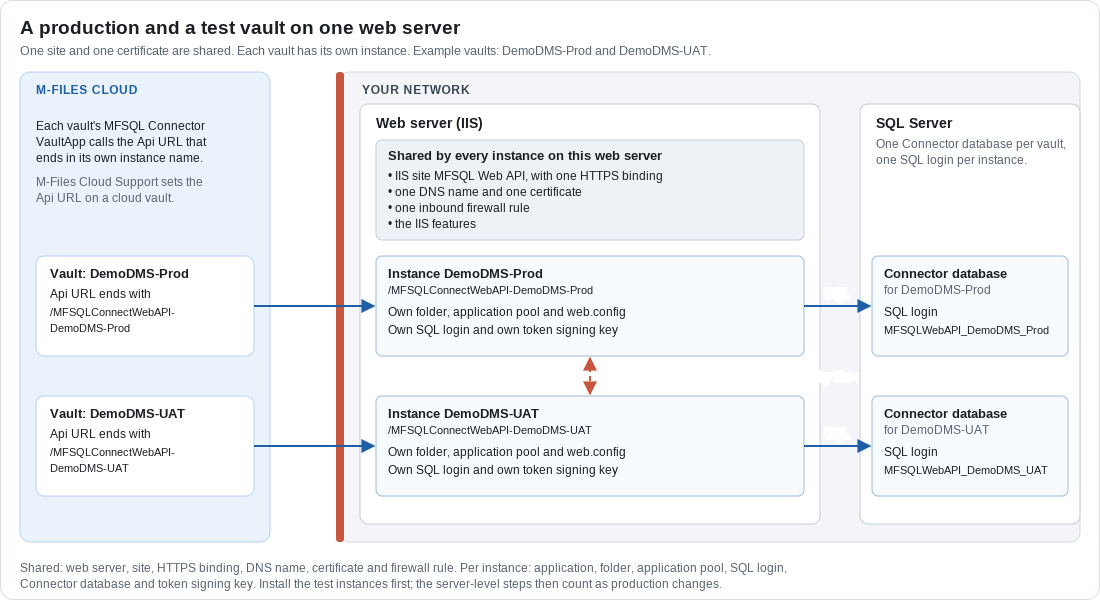
A production vault and a test vault on one web server. The site, DNS name and certificate are shared. Each vault has its own instance, SQL login, Connector database and token signing key. Select the diagram to open it full size.
The order of work follows from the two layers. Install and test the test vaults’ instances first, then the production ones (runbook, section 4). Decide beforehand which instances count as production changes, and whether the test instances may be installed on an earlier date (preparation).
When you add a second or later instance, run the endpoint test again for each existing instance as well, so isolation is checked in both directions (signing key page).
SQL Server on a different host
The web server and SQL Server can be two machines. The instance reaches its Connector database
over your network, with its own SQL login. The install scripts run on the web server. Where a DBA
owns SQL Server, the DBA runs the script the settings step generates for each vault
(Instances\<Key>.dba-install.sql), which creates the vault’s SQL login
(runbook, section 2).
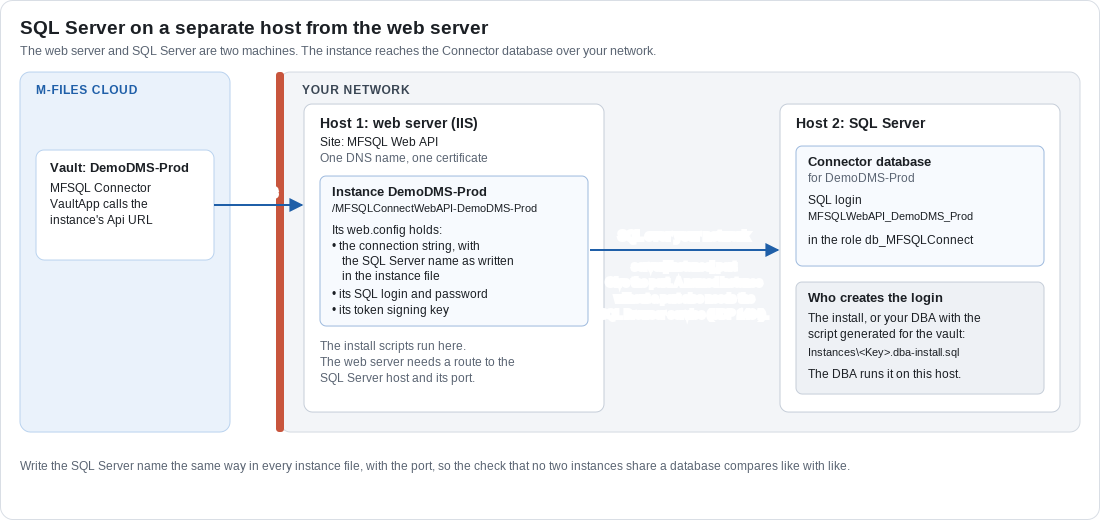
The web server and SQL Server on separate hosts. The SQL Server name in each instance file carries the port. Select the diagram to open it full size.
Write the SQL Server name the same way in every instance file, as its full name and port, for example
sql01.example.local,1433, or sql01.example.local\MFSQL,1433 for a named instance. Give the port
explicitly: SQL Server may listen on a dynamic port, and a named instance without a port needs the SQL
Browser service (UDP 1434) to be reachable too (reference guide).
The lab rehearsal of the install used separate hosts, so it exercised the connection between them: a web server reached one SQL Server on a default instance and another on a named instance with a static port.
M-Files Cloud vaults
For a vault in M-Files Cloud, four things about the web server’s side of the installation matter:
The DNS name must resolve from the internet. A dedicated alias, a CNAME to the web server, leaves the server’s own name to its other sites.
The certificate must come from a publicly trusted authority. An internal one works only where the calling M-Files server trusts its chain.
The Api URL is set by M-Files Cloud Support, through a ticket, because the field is not shown to the System Administrator of a cloud vault. It is fixed as soon as the DNS name and the instance key are agreed:
https://<dns-name>[:<HttpsPort>]/MFSQLConnectWebAPI-<Key>/.The firewall rule starts out allowing any address. The address range M-Files Cloud calls out from is requested from M-Files Cloud Support and may not be available. Once M-Files provides it, enter it and run
.\Install.ps1 -Serveragain to narrow the rule. Until then the Web API’s own authentication is the barrier: every request needs the API credentials, and a token that its own instance’s key signed.
The preparation page lists the ticket to raise and its timing: Preparing for a Web API installation.